loading experience

Development

Real-Time Streaming in .NET 10: Say Goodbye to Polling with Server-Sent Events (SSE)

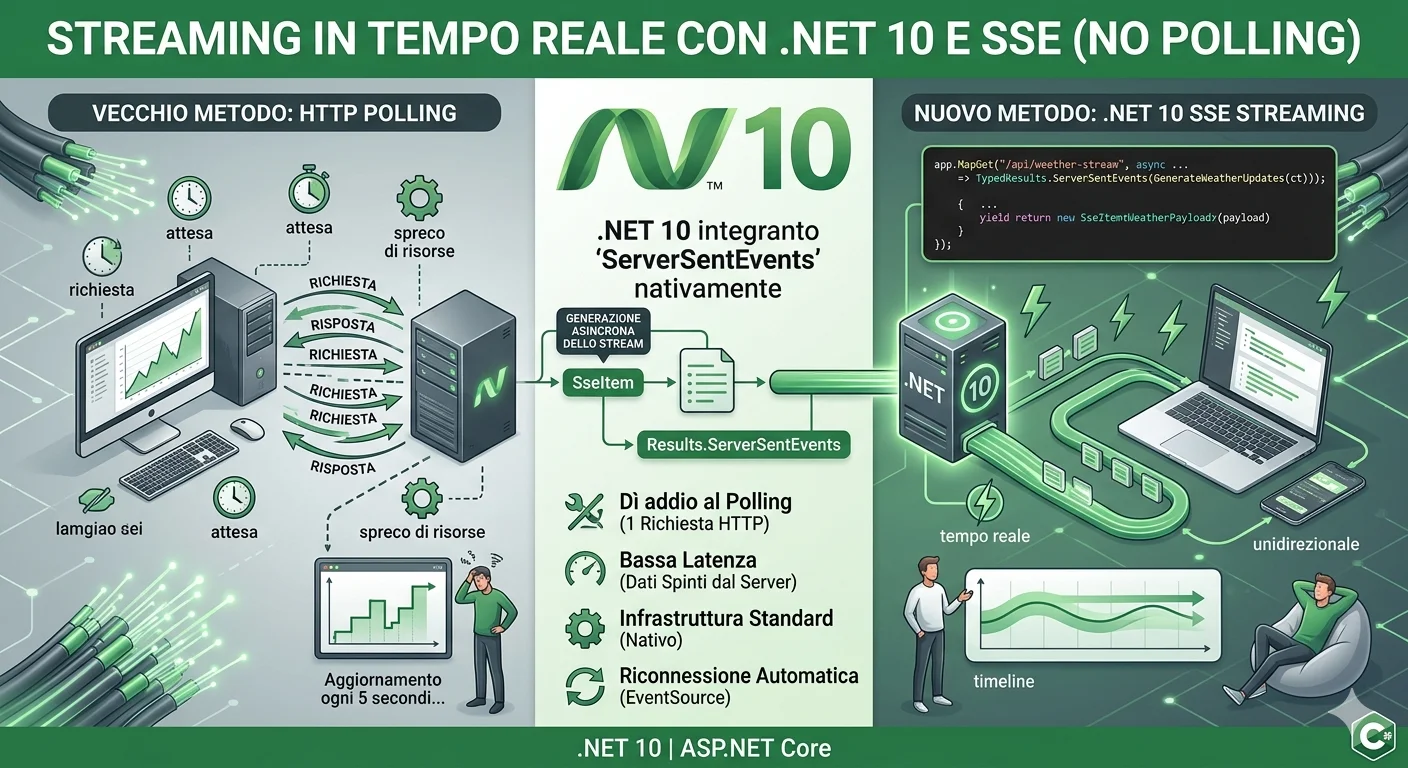
In modern web development, the need to update the user interface in real time is now standard. Historically, the simplest (but least efficient) approach has been HTTP Polling, in which the client bombards the server with requests at regular intervals.

Real-Time Streaming in .NET 10: Say Goodbye to Polling with Server-Sent Events (SSE)


In modern web development, the need to update the user interface in real time is now standard. Historically, the simplest (but least efficient) approach has been HTTP Polling, in which the client bombards the server with requests at regular intervals.

This approach involves an enormous waste of resources, latency, and unnecessary load on the server.

While for complex bidirectional communication the ideal choice falls on SignalR (WebSockets), there's a perfect middle ground for unidirectional data flows (from server to client): Server-Sent Events (SSE). With the release of .NET 10, ASP.NET Core finally introduces first-class native support that makes implementing SSE incredibly simple and clean.


Why choose SSE over Polling (and SignalR)?

Server-Sent Events rely on a single standard HTTP connection that stays open. The server pushes data to the client as soon as it's available, formatted according to the text/event-stream type.

  1. No Polling: The client makes a single HTTP request. No infinite loop of requests every $X$ seconds.
  2. Standard Infrastructure: Works over HTTP/1.1 or HTTP/2, with no need for protocol upgrades (as required by WebSockets). Works natively with proxies, firewalls, and load balancers.
  3. Automatic Reconnection: If the network drops, the browser automatically attempts to reconnect via the native EventSource API, sending the last received ID (Last-Event-ID) to avoid data loss.
  4. Lightweight: Compared to SignalR, it doesn't require heavy client libraries or complex server-side configuration.


The .NET 10 Breakthrough: Results.ServerSentEvents

In previous .NET versions, implementing SSE required manually configuring HttpContext.Response headers, writing formatted strings into the stream body, and manually handling buffer flushing and cancellation tokens.

In .NET 10, all of this is abstracted away thanks to the new Results.ServerSentEvents method (or TypedResults.ServerSentEvents) and the native SseItem<T> struct included in the System.Net.ServerSentEvents namespace. The framework autonomously handles JSON serialization, stream formatting, and respecting client cancellation.


Practical Example: Streaming Updates with .NET 10

Below is a complete example. The backend simulates a continuous stream of weather data sent to the client every 2 seconds without interruption.

1. The Backend (.NET 10 Minimal API)

Make sure you're using the .NET 10 SDK. Create an endpoint that returns an IAsyncEnumerable integrated with SseItem<T>.

C#


using System.Net.ServerSentEvents;
using System.Runtime.CompilerServices;

var builder = WebApplication.CreateBuilder(args);

// Enable CORS to let the frontend connect freely
builder.Services.AddCors(options => options.AddDefaultPolicy(policy =>
policy.AllowAnyOrigin().AllowAnyHeader().AllowAnyMethod()));

var app = builder.Build();
app.UseCors();

// SSE endpoint that sends real-time data streams without polling
app.MapGet("/api/weather-stream", async ([EnumeratorCancellation] CancellationToken ct) =>
{
// Local function to generate an async data stream
async IAsyncEnumerable<SseItem<WeatherPayload>> GenerateWeatherUpdates([EnumeratorCancellation] CancellationToken cancellationToken)
{
var random = new Random();
int eventId = 1;

while (!cancellationToken.IsCancellationRequested)
{
var payload = new WeatherPayload(
DateTime.Now.ToString("HH:mm:ss"),
random.Next(-5, 38)
);

// SseItem wraps the data and event metadata (e.g. the ID for reconnection)
yield return new SseItem<WeatherPayload>(payload)
{
EventId = eventId.ToString()
};

eventId++;
// Wait 2 seconds before the next send
await Task.Delay(2000, cancellationToken);
}
}

// .NET 10 automatically handles the text/event-stream header and data flushing
return TypedResults.ServerSentEvents(GenerateWeatherUpdates(ct));
});

app.Run();

// Record for the data payload
public record WeatherPayload(string Time, int TemperatureC);


2. The Frontend (Vanilla JavaScript)

On the client side no external library is needed. We leverage the native EventSource object provided by all modern browsers.

HTML


<!DOCTYPE html>
<html lang="en">
<head>
<meta charset="UTF-8">
<title>SSE Real-Time Stream (.NET 10)</title>
<style>
body { font-family: Arial, sans-serif; margin: 40px; background-color: #f4f4f9; }
#log { background: white; padding: 20px; border-radius: 8px; box-shadow: 0 2px 4px rgba(0,0,0,0.1); max-width: 500px; }
.event-item { padding: 8px; border-bottom: 1px solid #eee; }
</style>
</head>
<body>

<h2>Real-Time Weather Updates (No Polling)</h2>
<div id="log">Waiting for data from the server...</div>

<script>
// Initialize the persistent connection to the .NET 10 endpoint
const eventSource = new EventSource('http://localhost:5000/api/weather-stream');
const logDiv = document.getElementById('log');

// This event fires every time the server "yield return"s an SseItem
eventSource.onmessage = function(event) {
// Data arrives as a JSON string
const data = JSON.parse(event.data);
if(logDiv.innerText.includes("Waiting")) {
logDiv.innerHTML = '';
}

const item = document.createElement('div');
item.className = 'event-item';
item.innerHTML = `<strong>Time:</strong> ${data.time} | <strong>Temperature:</strong> ${data.temperatureC}°C (Event ID: ${event.lastEventId})`;
logDiv.insertBefore(item, logDiv.firstChild);
};

// Handling errors or disconnections
eventSource.onerror = function(error) {
console.error("Connection interrupted or network error. The browser will try to reconnect automatically...", error);
};
</script>
</body>
</html>


Conclusions

With .NET 10, Server-Sent Events step out of the shadow of custom implementations to become a first-class citizen in ASP.NET Core.

If your application only needs to receive updated data from the server (as with dashboards, notification feeds, streaming logs, or progressive responses from Artificial Intelligence/LLM models), SSE with TypedResults.ServerSentEvents is the architecturally cleanest, lightest, and most efficient solution at your disposal, finally putting the old, heavy polling mechanism out to pasture.

Comments (0)

No comments yet.

Leave a comment